
What this article covers
This article explains how to choose who can start a conversation with you in the chat feature on BIC Group. You can let everyone message you, review messages from people you do not know first, or stop new messages.
The steps are for the mobile app. The steps on a computer are similar.
When to use this article
- You want everyone to be able to message you.
- You want to review messages from people you do not know before you chat.
- You do not want to receive new messages from other people.
- You want to check why other people cannot message you, or why they must send a request first.
How to do it
1. Open direct message privacy settings
Purpose: go to the page where you choose who can message you.
- Select your profile picture → Settings & privacy → Privacy.
- Select Direct message privacy.
You can also open this setting quickly with the Message privacy settings link at the top of the Message Requests section.
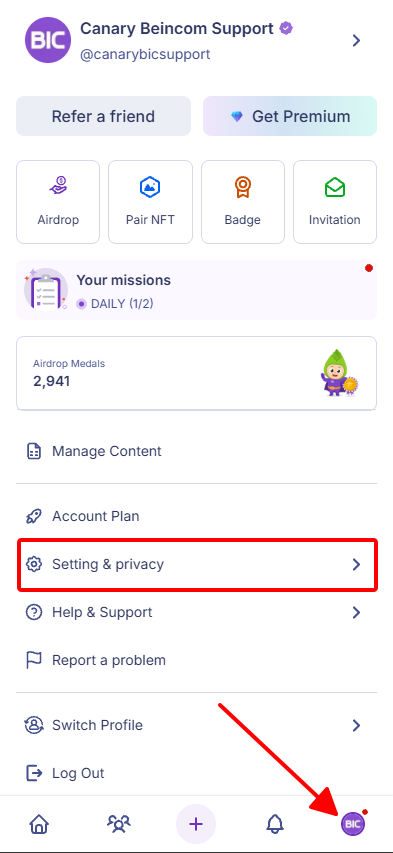
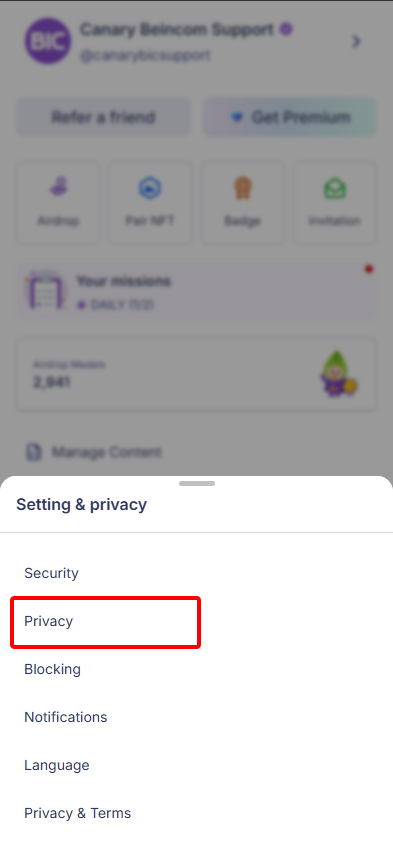
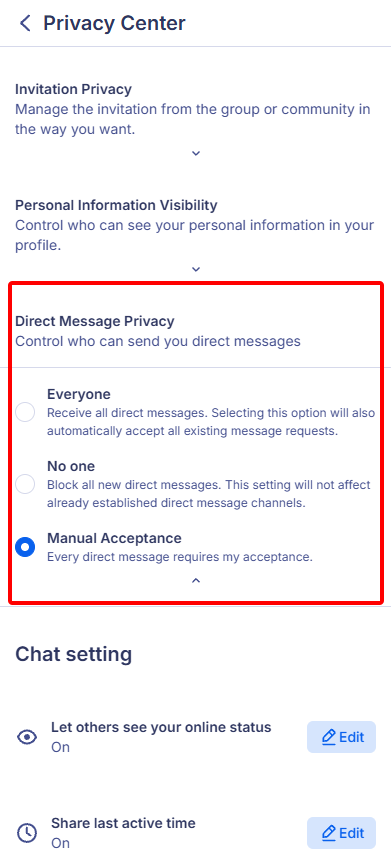
Result: the direct message privacy options appear.
2. Choose who can message you
Purpose: decide who can start a new conversation with you.
- Select one of the options below.
| Option | Description |
|---|---|
| Everyone | Anyone can message you |
| No one | Nobody can start a new conversation with you. People who chatted with you before can still message you as usual |
| Manual Acceptance (default) | People you do not know must send a message request. You can chat only after you accept it |
Result: your setting is saved immediately, and the message “Updated successfully” appears. The setting applies to new conversations with you.
Important notes
- People you do not know are people who are not your friends and have never chatted with you.
- No one means that you do not receive new messages. It does not mean “only I can see”.
- When you select No one, other people cannot find you when they search for someone to message. The chat icon also does not appear on your profile page or in member lists.
- When you change to Everyone, all pending message requests are accepted.
- This setting is shared with BIC Chat.
Not getting the result you expect?
Check the following items in order:
- You selected No one, but someone still messages you: that person chatted with you before.
- There are no requests in the Pending tab: you changed to Everyone, so all pending requests were accepted.
- You do not receive any message requests: your setting is Everyone or No one. Message requests appear only with Manual Acceptance.
Frequently asked questions
Does “No one” mean that only I can see my messages?
No. This option means that you do not receive new messages. Your existing conversations stay the same.
If I select “No one”, can people who chatted with me before still message me?
Yes. They can message you as usual.
How can I let people I do not know contact me, but still decide whether to chat?
Select Manual Acceptance. To learn how to view and manage message requests, see How to send and manage message requests.
Does changing this setting affect my existing conversations?
No. The setting applies only when someone starts a new conversation with you.
Need more help?
If you still have problems, send your feedback to the Beincom team by following the steps in How to report bugs or suggest features for BIC Apps.