
Note: The BIC Group app already includes the chat feature, so you do not need the BIC Chat app. The chat feature does not yet support push notifications on mobile when the app is in the background or closed. Until then, we recommend that you turn on email notifications so that you do not miss messages.
What this article covers
This article explains how to download and install the BIC Group app on an iPhone or an Android phone. It also explains how to open the chat feature in the app.
If you use BIC Chat, this article also explains what changes when you move to the chat feature on BIC Group.
When to use this article
- You are new to Beincom on mobile.
- You use the BIC Chat app and want to move to the chat feature on BIC Group.
- You have a new phone or need to install the app again.
- You cannot find BIC Group on the App Store or Google Play.
How to do it
1. Install BIC Group on an iPhone
Purpose: download the BIC Group app from the App Store.
- Open the App Store. You can also open BIC Group on the App Store directly and go to step 4.
- Tap the Search tab at the bottom of the screen.
- Type BIC Group in the search box.
- Find BIC Group: Web3 Community Hub by BEINCOM GLOBAL, and tap Get.
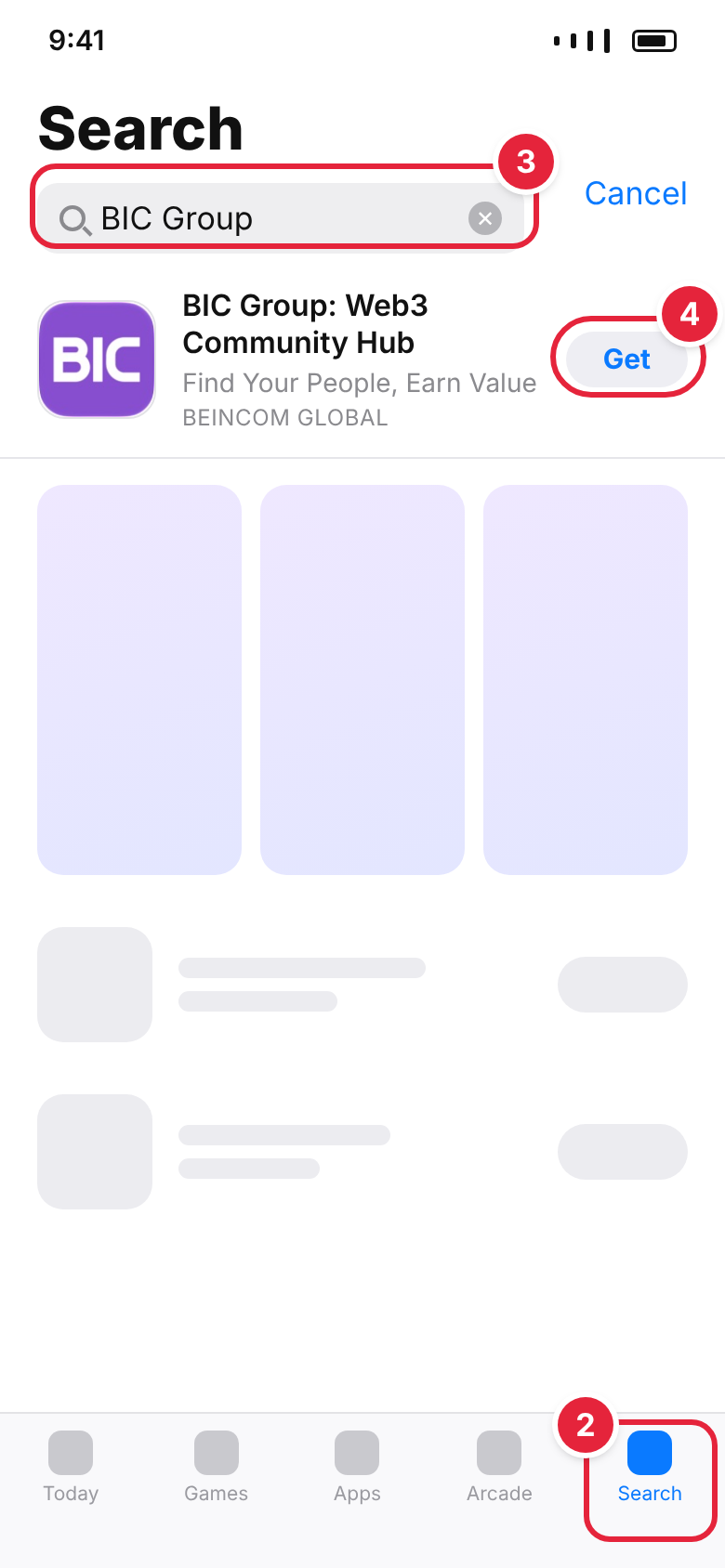
Result: the BIC Group icon appears on your home screen. Open the app and log in with your Beincom account.
2. Install BIC Group on an Android phone
Purpose: download the BIC Group app from Google Play.
- Open Google Play. You can also open BIC Group on Google Play directly and go to step 4.
- Tap the Search tab at the bottom of the screen.
- Type BIC Group in the search box.
- Find BIC Group: Web3 Community Hub by Beincom Global, and tap Install.
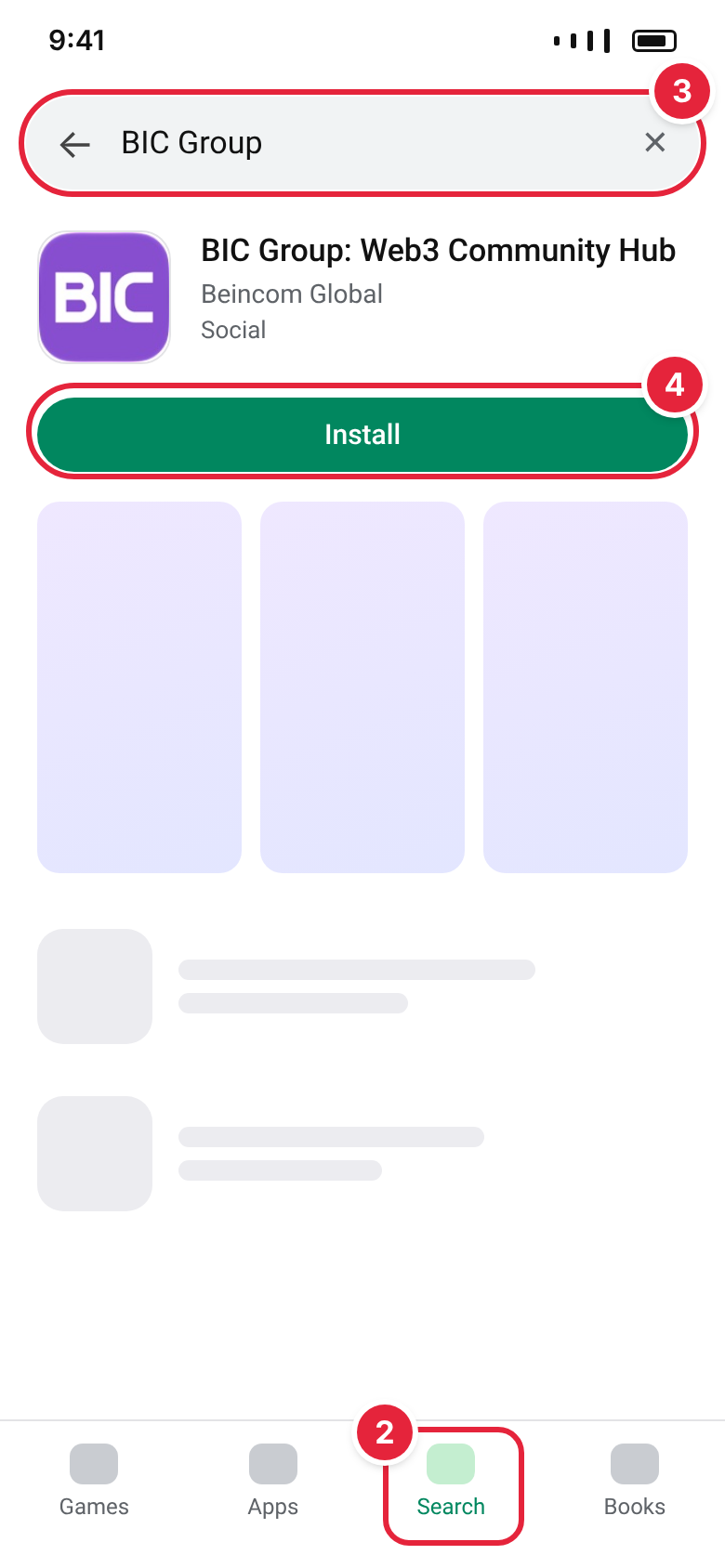
Result: the BIC Group icon appears on your phone. Open the app and log in with your Beincom account.
3. Open chat in BIC Group
Purpose: send messages and follow community channels in BIC Group, instead of the BIC Chat app.
- Open the BIC Group app.
- Tap the Chat icon in the navigation bar.
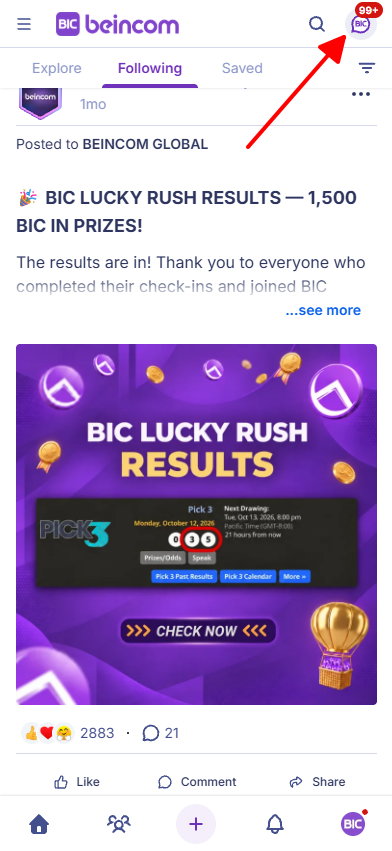
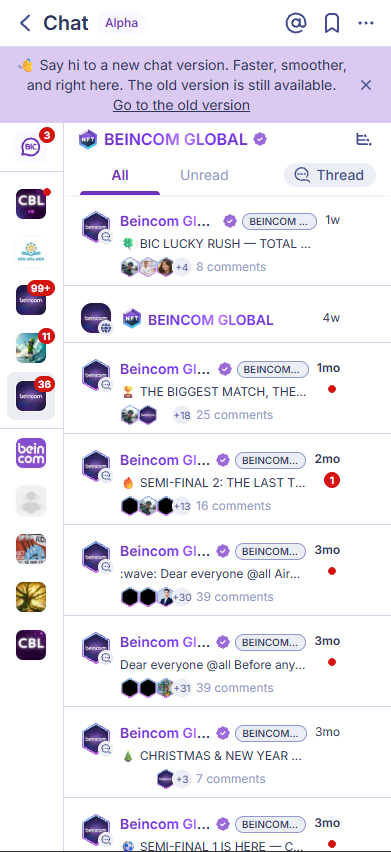
Result: the Chat Home screen opens. It shows your channels and conversations. All your old messages from BIC Chat are still there.
Important notes
- BIC Chat and the chat feature on BIC Group share messages, channels, saved messages, pinned messages, and notification settings. A change in one place also applies to the other place.
- Chat push notifications do not work yet when the app is in the background or closed. Other BIC Group notifications, such as posts and comments, work as usual.
- When you log out of BIC Group on a device, you also log out of chat on that device.
- Install BIC Group only from the App Store, Google Play, or the links in this article.
Cannot find BIC Group on the App Store or Google Play?
BIC Group is not available on the App Store or Google Play in some countries. In this case, install the app through TestFlight (iPhone) or Firebase (Android). Follow the steps below.
On an iPhone (TestFlight):
- Open the TestFlight link for BIC Group.
- Tap View in App Store.
- Download the TestFlight app.
- Open TestFlight and install BIC Group.
On an Android phone (Firebase):
- Open the Firebase link for BIC Group.
- Enter the email address of your Beincom account.
- Open the email that you receive, and follow the steps in the email to install the app.
- Open the BIC Group app and log in.
Frequently asked questions
Do I still need the BIC Chat app?
No. The BIC Group app already includes the chat feature. You can send messages, follow community channels, and get chat notifications in BIC Group.
Are my old messages from BIC Chat still there?
Yes. BIC Chat and the chat feature on BIC Group share the same messages and channels. You can see all your old messages.
Can I still use the old version of BIC Chat?
Yes. On Chat Home, tap Go to the old version in the welcome message. The BIC Chat app is also still available on the App Store and Google Play.
I installed BIC Group, but I do not see the Chat icon. What should I do?
Update BIC Group to the latest version on the App Store or Google Play. Then open the app again.
Why do I not get message notifications when the app is closed?
This is a current limitation of the chat feature. Turn on email notifications. See How to enable/disable chat notifications on BIC Group.
I do not have a Beincom account yet. What should I do?
Create an account by following the steps in How to sign up for a Beincom account.
Need more help?
If you still have problems, send your feedback to the Beincom team by following the steps in How to report bugs or suggest features for BIC Apps.